
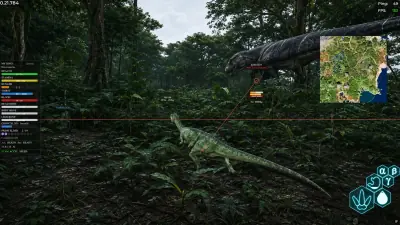
Dinosaur ESP and radar: two ways to read the scene
Understand dinosaur labels, world-space ESP and the 2D radar before choosing your display settings.
Read dinosaur ESP information in context
Dinosaur ESP places information beside an animal in the game view. Our listed fields include species, health, distance, weight and growth, alongside skeleton overlays. These fields answer different questions: a distance label describes separation, while growth describes the animal rather than its position.
A 2D radar offers a different arrangement. Nearby dinosaurs, nests and carcasses appear on an overlay instead of requiring you to read every label in the scene. Radar and ESP are complementary views; neither description establishes a guaranteed detection radius or complete coverage of a server.
Choose information deliberately
Start your comparison with the information you actually need to understand. If labels overlap, check which controls the current menu exposes before assuming that every element has its own filter. Our feature list establishes the displayed information, but does not document every layout adjustment.
Visibility through terrain and foliage is part of the ESP description. It does not establish that every marker is current, that an animal is reachable or that using the overlay is permitted. Review branch compatibility before purchase and treat server rules separately from software features.
Continue with EVRIMA compatibility: check the branch first.
For world markers, read our Resource ESP guide. It separates food and water tracking from dinosaur information.